File Menu
The File menu holds the commands that open, save, close, export and build a project. Saving and exporting explains the first four.
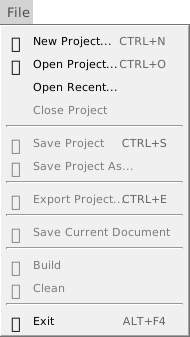
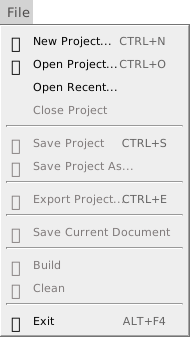
The commands from Close Project to Clean work on the open project, and are greyed out when none is open.
Open and close
- New Project… (Ctrl+N) and Open Recent…
- Open the New / Open Project dialog, on its New tab and on its Recent tab. Nothing is closed until you press Open in it. See New Project and Open a project.
- Open Project… (Ctrl+O)
- Opens a project file, or a
.vbpfile, which is imported as a new project. See Open a project. - Close Project
- Closes the project, after a question if it has unsaved changes. It has no key. See Close Project and Exit.
- Exit (Alt+F4)
- Closes the project, after the same question, and ends the IDE.
Save
- Save Project (Ctrl+S)
- Saves the whole project, with every open editor. For a project with no file, it asks for one first. See Save Project.
- Save Project As…
- Saves the project to a file that you choose, and keeps that file as the project’s. It has no key. See Save Project As.
- Save Current Document
- Is always greyed out, and has no key. The IDE saves the whole project, not one file.
Export
- Export Project… (Ctrl+E)
- Writes the project out to a folder as separate files, after it deletes everything in that folder. See Export Project, and read its warning first.
Build and Clean
- Build
- Compiles the project into the file that the Build Output Path setting names. The project templates set it to
${SourcePath}\Build\${ProjectName}_${Architecture}.${FileExtension}, a file in aBuildfolder beside the.twinproj.${Architecture}iswin32orwin64, as chosen in the build configuration box on the toolbar. It has no key. - Clean
- Deregisters the previously built DLL, if there is one, and deletes the previous build file. It has no key.