Importing a package from TWINSERV

Open the project from which you want to use a package, open the Settings file within it and navigate to the References section. Select the ‘Available Packages’ button, and all packages that are on the server should be shown:

The Project Settings dialog open over the IDE, with red numbers marking the route: 1 on the Project Explorer’s Project Settings gear, 2 on the Library References heading, 3 on the Available Packages tab. That tab lists the built-in and published packages with tick boxes and Embedded and Library Symbol columns.The Project Settings dialog open over the IDE, with red numbers marking the route: 1 on the Project Explorer’s Project Settings gear, 2 on the Library References heading, 3 on the Available Packages tab. That tab lists the built-in and published packages with tick boxes and Embedded and Library Symbol columns.

If you tick one of the available packages, it will be downloaded and imported into the project:

The Enabled Libraries tab after the ticks, where CSharpishStringFormater and FilePropertyExplorer now appear marked EMBEDDED-PACKAGE below the built-in compatibility packages and OLE Automation, with their library symbols Fmt and FileProps.The Enabled Libraries tab after the ticks, where CSharpishStringFormater and FilePropertyExplorer now appear marked EMBEDDED-PACKAGE below the built-in compatibility packages and OLE Automation, with their library symbols Fmt and FileProps.

Once you’re finished, press Apply Changes, which saves the project and restarts the compiler. Now you’re ready to use the package! In the example shown above I added a reference to the CSharpishStringFormater package, and I can now confirm that I can access components from the package in my code:
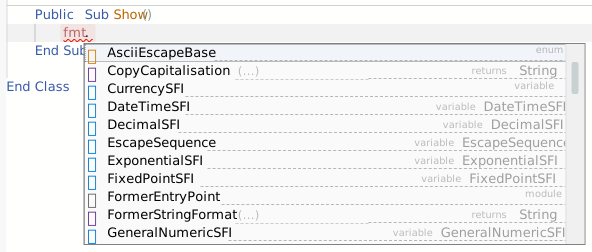
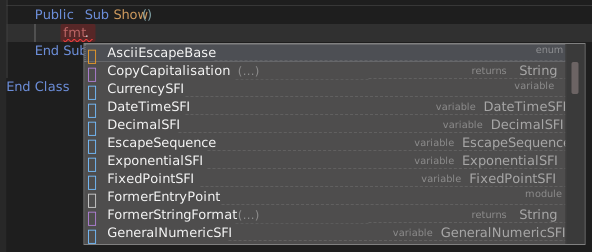
A code editor where typing fmt. has opened the completion list, offering the package’s members: AsciiEscapeBase, CopyCapitalisation, CurrencySFI, DateTimeSFI, DecimalSFI, EscapeSequence and more.A code editor where typing fmt. has opened the completion list, offering the package’s members: AsciiEscapeBase, CopyCapitalisation, CurrencySFI, DateTimeSFI, DecimalSFI, EscapeSequence and more.

Note: If you have any PRIVATE packages that you have published, they are only available when signed in. If you are not already signed in, you will see a warning link that you can click to login:

The yellow TIP link below the package list, offering to log in to see private packagesThe yellow TIP link below the package list, offering to log in to see private packages

After logging in, press the ‘Available’ button again to refresh the list.